
Native Swift + AppKit + SwiftUI · 100% Local on Your Mac · Zero Telemetry

Author Interactive Courses on Your Mac.
Open & Edit .story Files Without a VM.

CoursePan is a precision macOS authoring studio for instructional designers and educators. Build slide-based lessons with layers, states, timeline animations, variables, conditional triggers, and graded quizzes—or import existing .story archives directly on macOS and publish to standalone HTML5 or SCORM 1.2.

✓ Universal Binary (Apple Silicon & Intel) ✓ Sandboxed & 100% Offline ✓ Standalone HTML5 & SCORM 1.2 ZIP Export ✓ Verified StoryExportReadback Gate
CoursePan — Make the Call.atelier (Edited) — Authoring Canvas
16:9 Stage connect-src 'none'
ScenarioComplete: Bool LearnerNotes: Text AttemptCount: Number
SCENE 01 · SLIDE 02 · BRANCHING SCENARIO
Selected · Text Block

The client says: “Our conference starts tomorrow and the kits aren't here.”

Selected · Callout Card
Choose your opening response. Each choice reveals a slide layer and updates the ScenarioComplete variable.
Selected · Button A
“What is your 9-digit order number?”
Selected · Button B
“I see the overnight shipment is delayed—let's get replacements to your hotel now.”
Selected: #headline · Entrance: Fade (0.45s) · Gate: StoryExportReadback PASS Click any element on the stage or edit in the Inspector →
Interactive Button Fill Swatch
Live Surgical XML Writeback Preview
<!-- story/slides/s2.xml (Surgical Writeback) -->
<shp id="headline" fill="#1e293b">
  <text>The client says: “Our conference starts tomorrow…</text>
  <anim entrance="fade" />
  <trig action="Show Layer: Spot On Layer" />
</shp>
SLIDE 1 OF 4 · WELCOME CoursePan Local HTML5 Runtime

Make the Call: High-Stakes Support Scenario

You are playing a live CoursePan HTML5 lesson right inside your browser. Click through the scenario and watch the SCORM 1.2 runtime console on the right log every CMI call.

Press Esc in macOS app to exit Preview
SCORM 1.2 API Runtime Inspector window.API
cmi.core.lesson_status "incomplete"
cmi.core.score.raw "0"
cmi.core.lesson_location "slide_1"
var.ScenarioComplete false
[00:00:01] LMSInitialize("") → "true"
[00:00:01] LMSSetValue("cmi.core.lesson_status", "incomplete") → "true"
[00:00:01] LMSSetValue("cmi.core.lesson_location", "slide_1") → "true"
Published SCORM 1.2 ZIP archives include imsmanifest.xml, scorm12.js, and offline HTML5 assets with zero external network calls.
GATE PASS · StoryExportReadback Verified · 1 XML Part Modified, 47 Parts Untouched
Target Archive Entry: story/slides/slide1.xml Original .story archive retained inside .atelier bundle

Before (Original .story XML Part)

<p><r><rPr sz="24" foreClr="#333333"/><t>Welcome to Training</t></r></p>
<!-- All sibling shapes, GUIDs, and master refs preserved -->

After (Surgical Writeback + Readback Proof)

<p><r><rPr sz="24" foreClr="#0F172A"/><t>Make the Call: Escalations</t></r></p>
<!-- Exact paragraph/run structure updated in place; zero sibling drift -->

How CoursePan protects your files: When you import a .story archive, CoursePan embeds the original archive inside your .atelier project so you can always export an unchanged copy. When you choose Export Storyline Copy…, CoursePan patches only the modified XML nodes, verifies the resulting archive through StoryExportReadback, and refuses to write unproven edit types rather than risking silent file corruption.

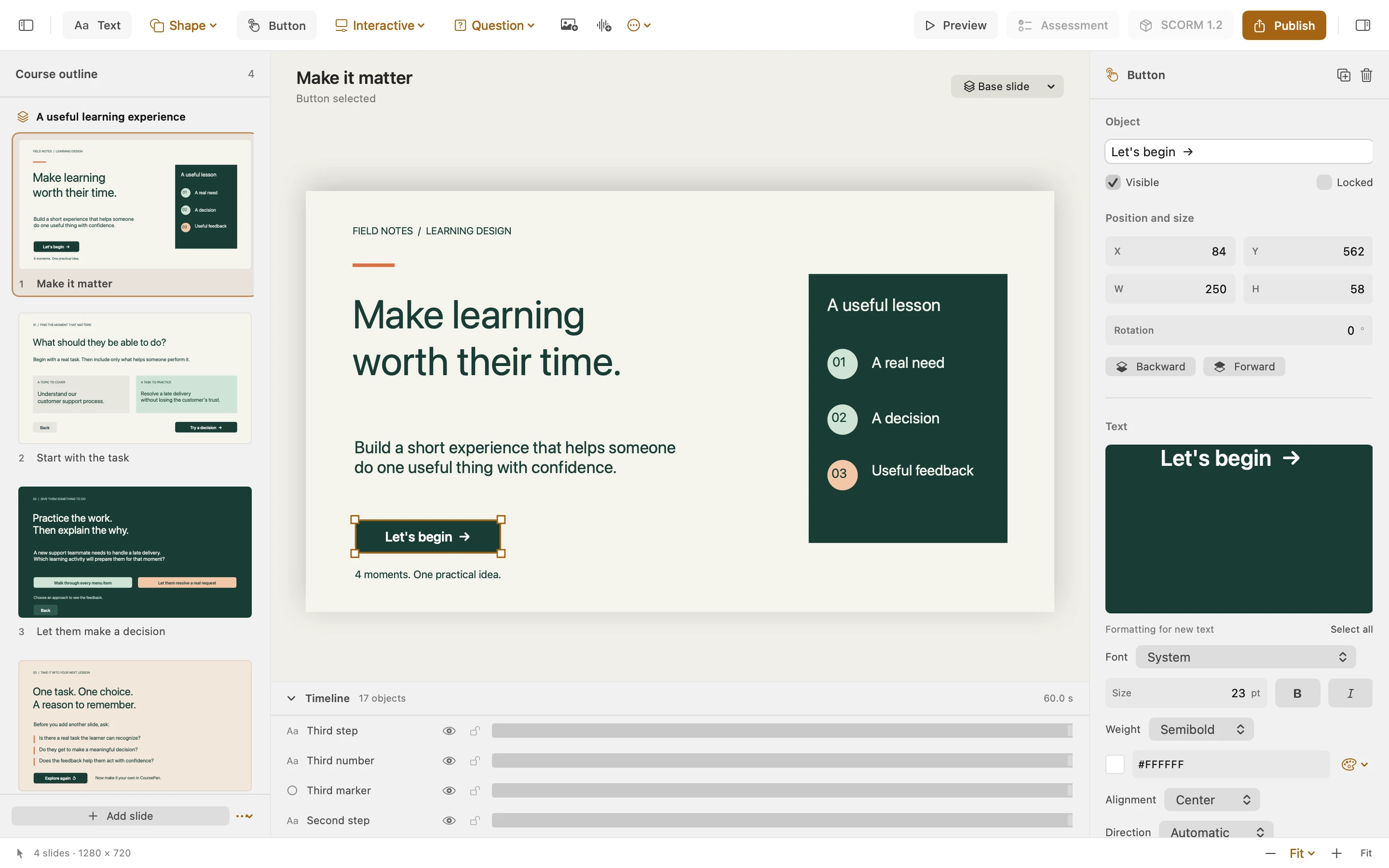
CoursePan macOS Authoring Workspace showing scenes, 16:9 interactive stage, and Inspector

Authoring Workspace — Native SwiftUI & AppKit three-column studio with scene outline, interactive stage handles, and coordinate/style Inspector.

Built for Instructional Designers on macOS

Work With .story Projects Without Booting a Windows VM

Instructional designers on Mac shouldn't need a 60 GB virtual machine just to inspect, update, preview, or republish a .story course. CoursePan gives you two clear, honest workflows.

Workflow 01 · Open as Editable Course

Convert Scenes, Slides, Question Banks, Layers, States & Triggers

Choose File > Import Storyline Project… and select Open as Editable Course. CoursePan parses the .story archive directly on macOS—converting scenes, slides, question banks, slide layers, shapes, rich text runs, embedded images, audio/video tracks, object states, timeline animations, variables, and conditional triggers into an editable CoursePan document.

Scenes & Slides Question Banks (draw/qbank) Slide Layers Object States Variables & Triggers Embedded Media
Workflow 02 · Linked .story Custody

Byte-Exact Original Retention + Checked Writeback

CoursePan retains the original .story archive inside your project package so Export Original… always produces an unchanged byte-identical copy. When you use Export Storyline Copy…, every edit is checked by StoryEditProofs and verified by StoryExportReadback before a single byte is written to disk.

SHA-256 Custody StoryExportReadback
Interactive Elements

Hotspots, Markers, Sliders, Dials & Freeform Drag-and-Drop

Author rich interactive slide elements beyond static text and rectangles: interactive buttons, hotspots, labeled callout markers, numeric sliders, rotary dials, audio/video tracks, and freeform drag-and-drop interactions.

Hotspots & Markers Sliders & Dials Drag & Drop
Assessments & LMS Publishing

Graded Quizzes, Results Slides & SCORM 1.2 Packages

Build single-choice, multiple-choice, and drag-and-drop question slides with configurable attempt limits, custom point weights, feedback overlays, and a graded results slide. Export a self-contained HTML5 web archive or a standard SCORM 1.2 ZIP package for your LMS.

imsmanifest.xml cmi.core.score.raw cmi.suspend_data
Privacy by Architecture

Zero Accounts, Zero Cloud Uploads, Zero Analytics

CoursePan runs inside the macOS App Sandbox with zero third-party SDKs. Your proprietary training materials, client .story archives, and exported SCORM packages never leave your Mac. Local previews run with connect-src 'none'.

App Sandbox Data Not Collected
Transparent Engineering Scope

CoursePan 1.0 Capability & .story Verification Matrix

We believe authoring tools should be transparent about exactly what they import, what they publish to HTML5/SCORM 1.2, and which edits are permitted by the checked .story writeback gates.

Capability Area Native Authoring & HTML5 / SCORM 1.2 .story Import & Checked Writeback Scope 1.0 Status
Scenes, Slides & Question Banks Create, rename, duplicate, delete, and reorder scenes and slides in the outline. Imports scenes, slides, and question-bank draw slides; surgical slide rename, add, delete, and reorder verified by StoryExportReadback. ✓ Verified in 1.0
Rich Text, Geometry & Shape Styling Edit text, font size, colors, solid fills, strokes, coordinates, size, and rotation. Surgical in-place XML writeback updates edited text runs, bounds, rotation, fill, and stroke while preserving untouched sibling nodes. ✓ Verified in 1.0
Slide Layers & Object States Author base slide + feedback/overlay layers and built-in or custom object states (Normal, Hover, Selected, Visited, Disabled). Imports slide layers and object states; supports adding/removing layers and mutating state overrides with readback verification. ✓ Verified in 1.0
Timeline Entrance & Exit Animations 12 entrance/exit effects in the HTML5 & SCORM 1.2 player (Fade, Fly, Swivel, Spin, Grow/Shrink, Float, Bounce, Wipe, Split, Wheel, Random Bars, Zoom) + motion paths. Fade, Fly, and Swivel are proven for .story import and surgical writeback; HTML5-only effects are clearly labeled and gated on .story export. 3 Proven .story / 12 HTML5
Variables & Conditional Triggers True/False, Text, and Number variables; triggers for slide jumps, showing/hiding layers, opening URLs, and setting/adding variable values with conditions. Imports Storyline variables and navigation/layer/variable triggers and writes validated trigger and variable edits back to the .story archive. ✓ Verified in 1.0
Quizzes, Results & SCORM 1.2 Export Single-choice, multiple-choice, and drag-and-drop question slides with attempt limits, point weights, feedback layers, and graded results slides. Publishes standalone HTML5 ZIP archives and standard SCORM 1.2 packages (imsmanifest.xml + CMI runtime reporting). ✓ Verified in 1.0